UI Packs
Bitrush HUD Frame Set
12 Y2K HUD frames for dark interfaces — ink black with signal yellow accents. SVG plus transparent PNG at 1x, 2x and 4x.
About this pack
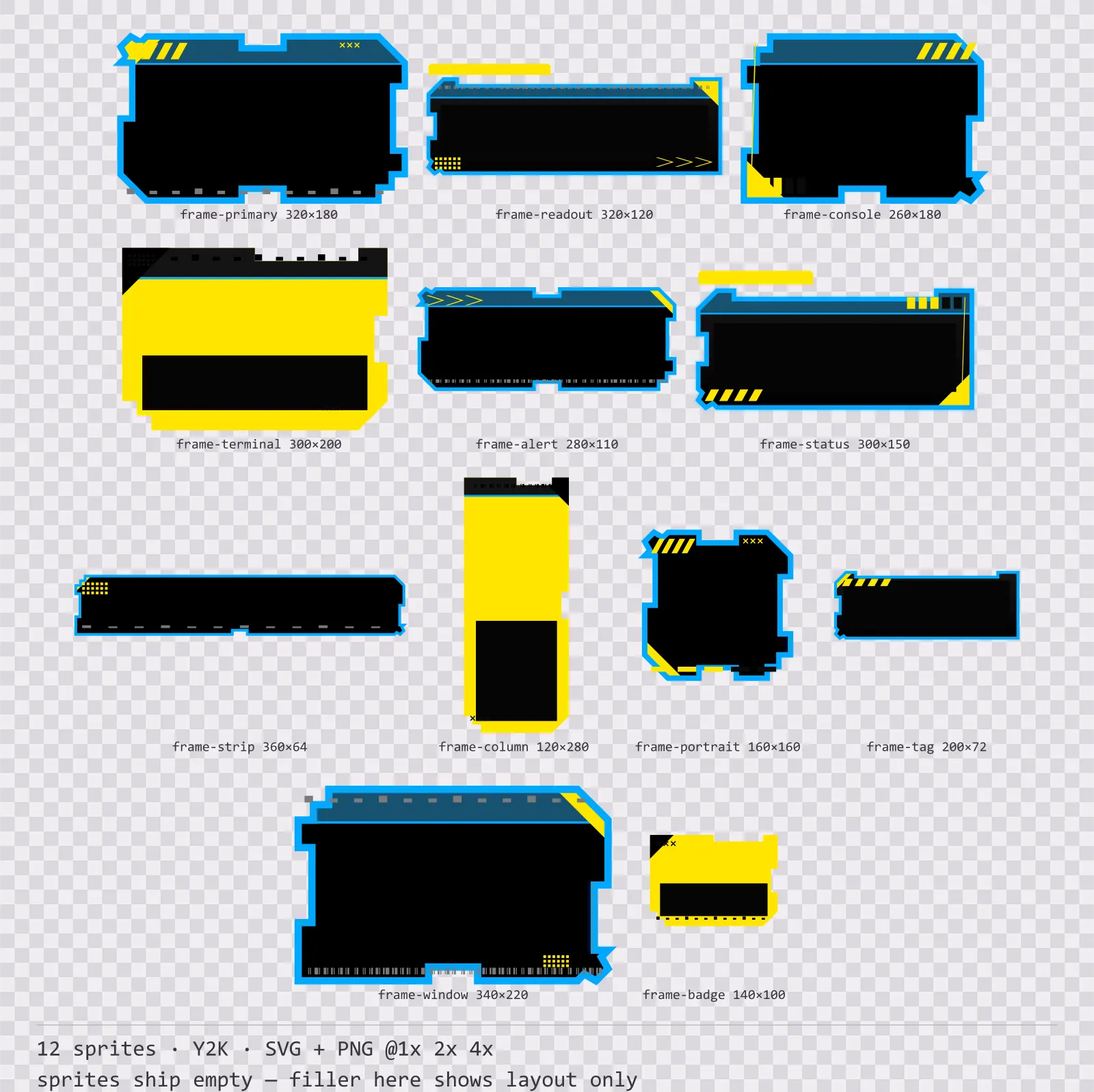
Bitrush HUD Frame Set is a set of 12 HUD frames drawn in the Y2K style, where everything is flat and printed — thick straight outlines, solid blocks, no glow anywhere. It contains a primary panel frame, a data readout frame, a console frame, a terminal frame, an alert banner, a wide status strip, a tall side column, a square portrait frame and a label tag and a compact badge.
Most free HUD sets are one rectangle at twelve sizes. That is the tell: real interface art gives every frame its own outline, because a readout, a portrait and an alert banner do not have the same job and should not have the same shape. A set where the only difference is width reads as filler the moment you place two of them on screen together.
No gradient and no halo: the whole set is flat colour with a heavy straight outline, which is what separates the Y2K poster look from the neon one. The silhouettes are composed corner by corner rather than scaled from one rectangle, so a badge and a banner in the same set do not share an outline.
Inside that style this is the Bitrush reading of it: a dark interface on a ink black palette with signal yellow accents, built around a header band across the top of the frame, tab-shaped buttons at 148x52, banded bars divided into 8 segments, and solid icons on a 16px grid. Those measurements are why two families can share an art style without being interchangeable: the style decides how an edge is drawn, the numbers decide what the interface is for.
Every frame here has its own silhouette — the four corners and four edges are treated independently, so one frame has a notched top-right and a railed side while the next has folded corners and a vee on both long edges. None is a scaled copy of another. The applied marks (hatch blocks, tick rows, barcode strips, chevrons) sit only on the edges: the middle stays clear because that is where your map, portrait or text goes.
Every sprite ships as an editable SVG and as transparent PNG at 1x, 2x and 4x, so you can drop the PNGs straight into an engine or open the vector and change a colour. Built to the same measurements as the rest of the Bitrush family, which means this kit and the Bitrush panel kit line up without either being resized. A good fit for retro-futuristic menus and poster-styled interfaces.
Download
Direct link · no sign-up · no wait pageComplete set — SVG sources, PNG exports at 1x/2x/4x, licence and readme
How to use it
- Nine-slice on the flat regions only. Each frame ships its safe margins in the specs box, and the sides whose middle carries a notch or a vee are marked unstretchable — stretch those and the mark grows with the frame.
- Draw your content inside the frame, not over it: every silhouette leaves the centre empty on purpose, and none of the applied marks reaches into it.
- The glow is drawn as stacked strokes rather than a blur filter, so the 4x PNG stays sharp. If you want a stronger bloom, add it in-engine on top rather than scaling the sprite.
License
Creative Commons Zero 1.0 — Public domain. No credit required. Full terms · What this means in practice
Also browse
More UI Packs
See all →
Aetherlab Backdrops
13 magitech background and overlay pieces for dark interfaces — lab navy with aether cyan accents. SVG plus transparent PNG at 1x, 2x and 4x.

Aetherlab Card Frames
18 magitech card, currency and notification components for dark interfaces — lab navy with aether cyan accents. SVG plus transparent PNG at 1x, 2x and 4x.

Aetherlab Character Sheet
12 magitech character sheet and stat widgets for dark interfaces — lab navy with aether cyan accents. SVG plus transparent PNG at 1x, 2x and 4x.

Aetherlab Crafting UI
13 magitech crafting and recipe widgets for dark interfaces — lab navy with aether cyan accents. SVG plus transparent PNG at 1x, 2x and 4x.