UI Packs
Oak Input Prompts
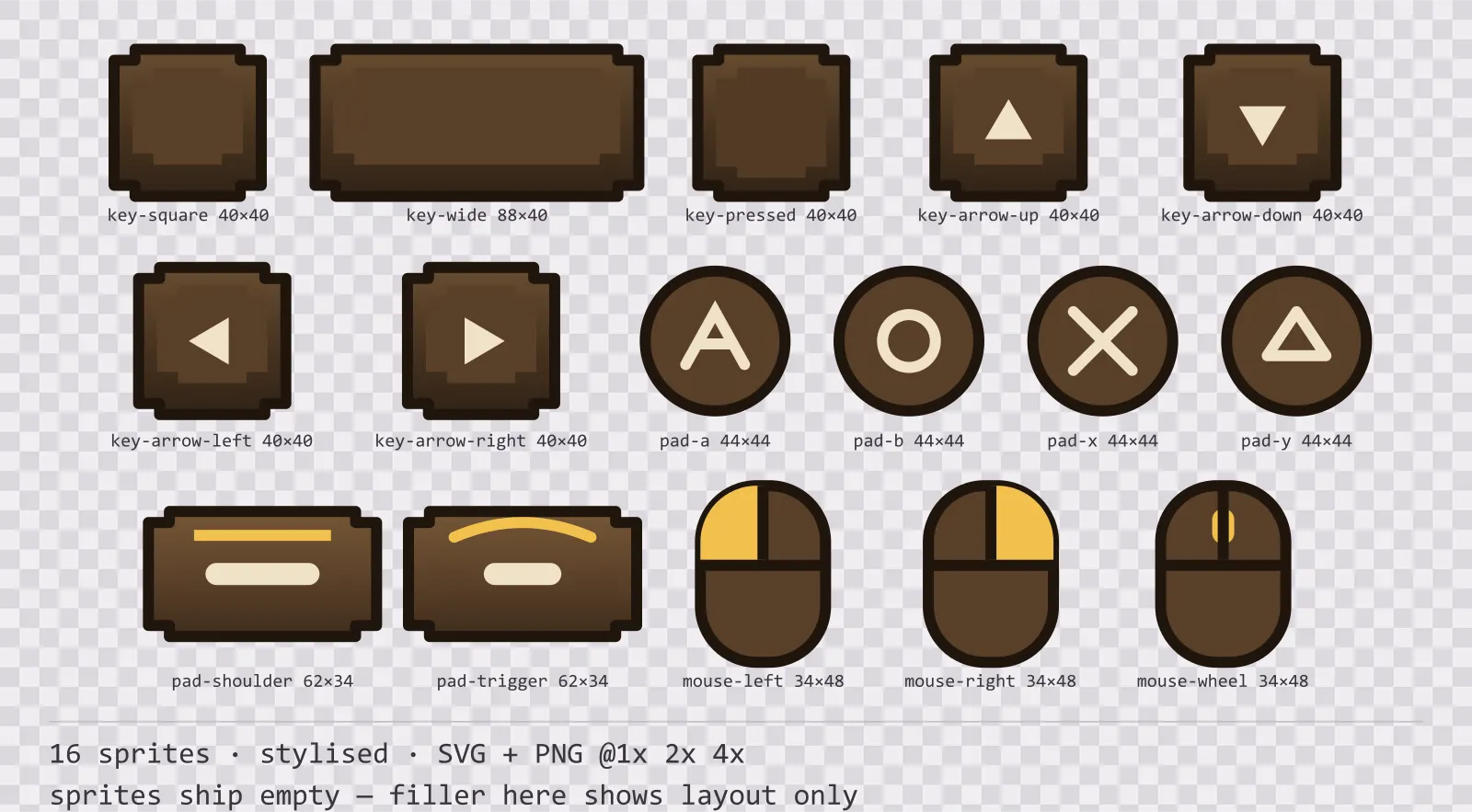
16 stylised input prompt sprites for dark interfaces — wood-brown with polished brass accents. SVG plus transparent PNG at 1x, 2x and 4x.
About this pack
Oak Input Prompts is a set of 16 input prompt sprites drawn in the stylised style, where the frame is carved, with finials pushing out past the corners and a gem set into each one. It contains square, wide and pressed keycaps, four arrow keys, four gamepad face buttons, a shoulder button and a trigger and three mouse button prompts.
A game that supports both a keyboard and a gamepad has to show both, at matching sizes, in the same sentence — and almost nobody ships that art, so it gets drawn by hand at the end of a project when there is no time for it.
The ornament is part of the silhouette rather than drawn on top of it, so the frame is recognisable at thumbnail size. The face carries a three-stop vertical gradient — the closest a flat kit gets to a painted bevel.
Inside that style this is the Oak reading of it: a dark interface on a wood-brown palette with polished brass accents, built around two concentric frames, tab-shaped buttons at 160x48, glossy bars divided into 8 segments, and solid icons on a 32px grid. Those measurements are why two families can share an art style without being interchangeable: the style decides how an edge is drawn, the numbers decide what the interface is for.
No letters are drawn anywhere in this set. Embedding a typeface means embedding its licence, and a baked-in "E" is wrong in every remapped control scheme and every language; the shapes are here and your engine draws the glyph on top with the font it already has.
Every sprite ships as an editable SVG and as transparent PNG at 1x, 2x and 4x, so you can drop the PNGs straight into an engine or open the vector and change a colour. Built to the same measurements as the rest of the Oak family, which means this kit and the Oak panel kit line up without either being resized. A good fit for fantasy and RPG interfaces.
Download
Direct link · no sign-up · no wait pageComplete set — SVG sources, PNG exports at 1x/2x/4x, licence and readme

How to use it
- Draw the key label with your own font centred on the cap face, which sits slightly above centre — the offset is what makes the cap look pressable.
- Swap the pressed keycap in on key-down for a one-frame press effect rather than scaling the sprite, which breaks the outline weight.
- Keep gamepad and keyboard prompts at the same optical height in a line of text; the 44px pad button and 40px keycap are sized to match already.
License
Creative Commons Attribution 4.0 — Free for commercial use. Credit required. Full terms · What this means in practice
"Oak Input Prompts" by Oğuzhan Girgin, licensed under CC BY 4.0 — https://www.colorosse.com/assets/2d/ui/oak-input-promptsAlso browse
More UI Packs
See all →
Aetherlab Backdrops
13 magitech background and overlay pieces for dark interfaces — lab navy with aether cyan accents. SVG plus transparent PNG at 1x, 2x and 4x.

Aetherlab Card Frames
18 magitech card, currency and notification components for dark interfaces — lab navy with aether cyan accents. SVG plus transparent PNG at 1x, 2x and 4x.

Aetherlab Character Sheet
12 magitech character sheet and stat widgets for dark interfaces — lab navy with aether cyan accents. SVG plus transparent PNG at 1x, 2x and 4x.

Aetherlab Crafting UI
13 magitech crafting and recipe widgets for dark interfaces — lab navy with aether cyan accents. SVG plus transparent PNG at 1x, 2x and 4x.