UI Packs
Reliquary Shop UI
12 stylised shop and economy widgets for dark interfaces — deep indigo with pale silver accents. SVG plus transparent PNG at 1x, 2x and 4x.
About this pack
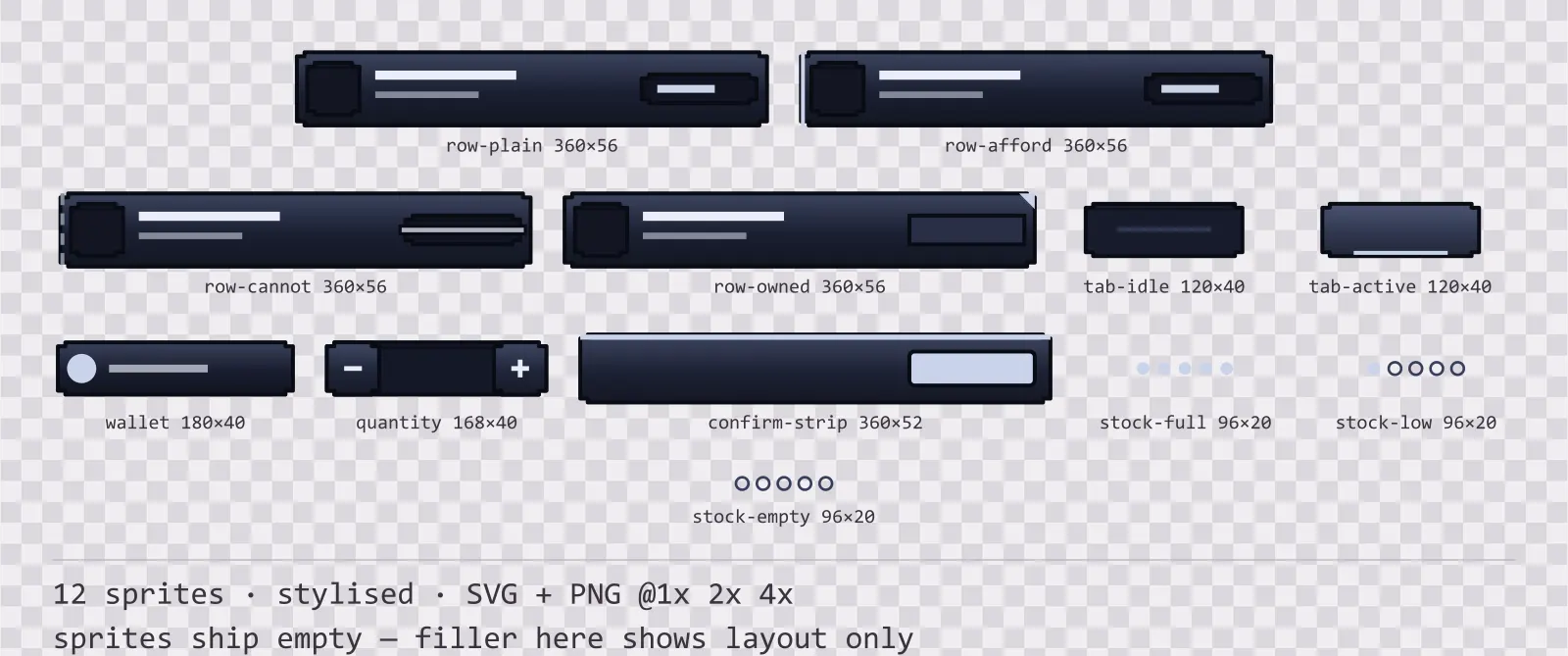
Reliquary Shop UI is a set of 12 shop and economy widgets drawn in the stylised style, where the frame is carved, with finials pushing out past the corners and a gem set into each one. It contains four purchase row states, an active and an idle category tab, a wallet strip, a quantity stepper, a purchase confirm strip and three countable stock indicators.
A shop screen has one job an inventory screen never has: it must tell the player what they cannot afford before they press the button. Most free sets solve that by turning the price red, which fails for the players who cannot read that red and fails again on a greyscale screenshot. It also collides with the health colour every other part of the interface already uses.
The ornament is part of the silhouette rather than drawn on top of it, so the frame is recognisable at thumbnail size. The face carries a three-stop vertical gradient — the closest a flat kit gets to a painted bevel.
Inside that style this is the Reliquary reading of it: a dark interface on a deep indigo palette with pale silver accents, built around a header band across the top of the frame, chamfered buttons at 128x56, hollow-cored bars divided into 12 segments, and two-tone icons on a 24px grid. Those measurements are why two families can share an art style without being interchangeable: the style decides how an edge is drawn, the numbers decide what the interface is for.
The four row states are told apart by structure rather than by colour. An affordable row carries a solid strip down its left edge, an unaffordable one carries a dashed strip and a bar struck across its price field, and an owned one caps the price field shut and marks its top-right corner. That means the state survives a tint, a colourblind filter and a screenshot with the saturation pulled out. The stock indicator is countable for the same reason: five dots, one dot and none read as full, low and sold out without a single word or hue.
Every sprite ships as an editable SVG and as transparent PNG at 1x, 2x and 4x, so you can drop the PNGs straight into an engine or open the vector and change a colour. Built to the same measurements as the rest of the Reliquary family, which means this kit and the Reliquary panel kit line up without either being resized. A good fit for fantasy and RPG interfaces.
Download
Direct link · no sign-up · no wait pageComplete set — SVG sources, PNG exports at 1x/2x/4x, licence and readme

How to use it
- Nine-slice the rows on their straight left and right regions; the price field on the right is a fixed width so a long item name never pushes it out of alignment.
- Use the dashed strip and the struck price for unaffordable rather than a red tint. Both are pattern rather than hue, so they hold up in greyscale.
- Stack the stock dots in the same slot every row uses, and drive them by count rather than by colour.
- The confirm strip and the quantity stepper share a height, so a shop can put them on the same line without either being resized.
License
Creative Commons Attribution 4.0 — Free for commercial use. Credit required. Full terms · What this means in practice
"Reliquary Shop UI" by Oğuzhan Girgin, licensed under CC BY 4.0 — https://www.colorosse.com/assets/2d/ui/reliquary-shop-uiAlso browse
More UI Packs
See all →
Aetherlab Backdrops
13 magitech background and overlay pieces for dark interfaces — lab navy with aether cyan accents. SVG plus transparent PNG at 1x, 2x and 4x.

Aetherlab Card Frames
18 magitech card, currency and notification components for dark interfaces — lab navy with aether cyan accents. SVG plus transparent PNG at 1x, 2x and 4x.

Aetherlab Character Sheet
12 magitech character sheet and stat widgets for dark interfaces — lab navy with aether cyan accents. SVG plus transparent PNG at 1x, 2x and 4x.

Aetherlab Crafting UI
13 magitech crafting and recipe widgets for dark interfaces — lab navy with aether cyan accents. SVG plus transparent PNG at 1x, 2x and 4x.