UI Packs
Reliquary Loading
20 stylised loading and waiting indicators for dark interfaces — deep indigo with pale silver accents. SVG plus transparent PNG at 1x, 2x and 4x.
About this pack
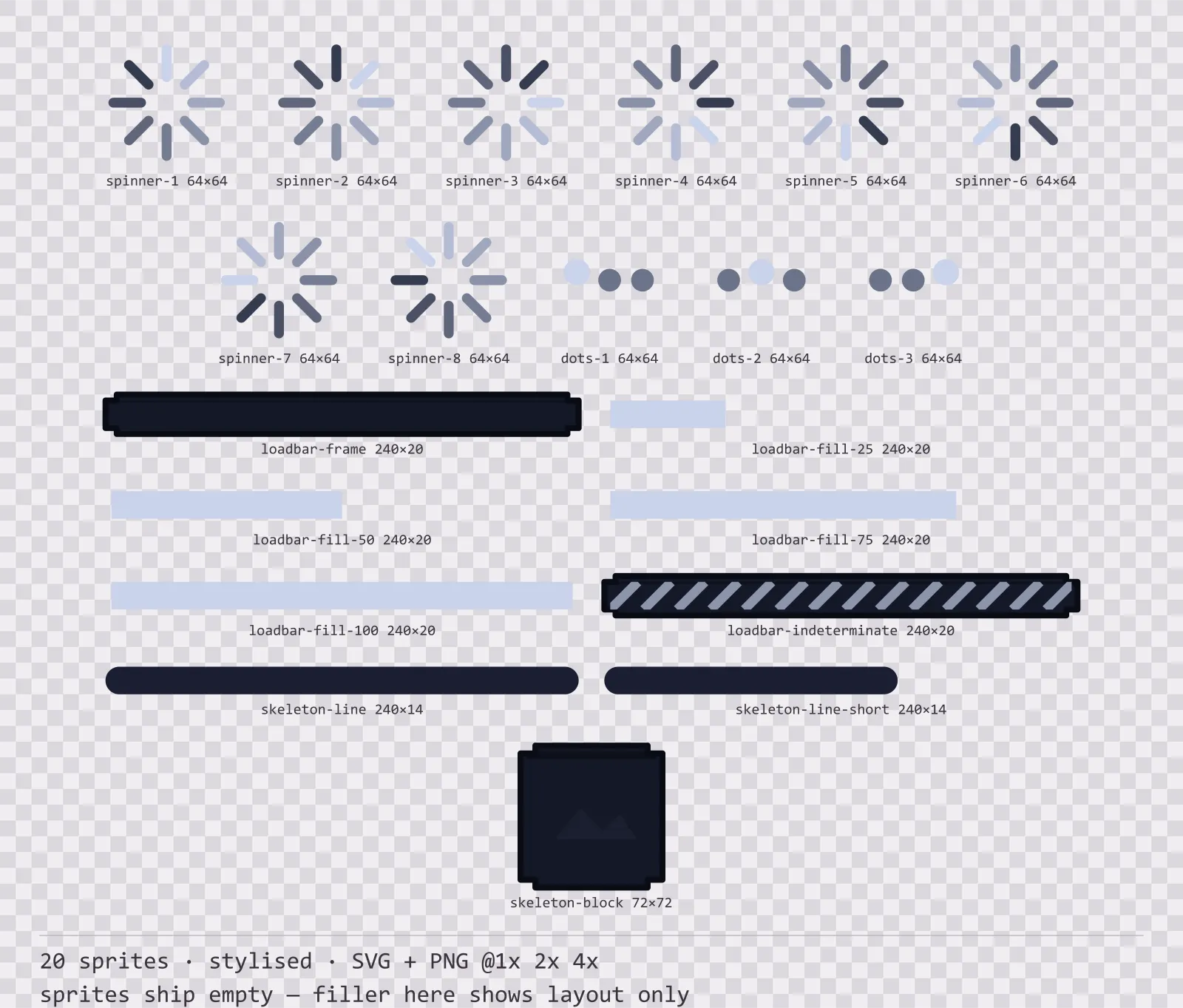
Reliquary Loading is a set of 20 loading and waiting indicators drawn in the stylised style, where the frame is carved, with finials pushing out past the corners and a gem set into each one. It contains an eight-frame spinner, a three-frame dot cycle, a loading bar frame with four fill steps, an indeterminate striped bar, two skeleton text lines and a skeleton image block.
The loading screen is the screen a player looks at longest and the one nobody makes art for. It is also the one place where a bar means something different from everywhere else: a resource bar shows a value, a loading bar shows a process, and using the same sprite for both is how a health bar ends up on a loading screen.
The ornament is part of the silhouette rather than drawn on top of it, so the frame is recognisable at thumbnail size. The face carries a three-stop vertical gradient — the closest a flat kit gets to a painted bevel.
Inside that style this is the Reliquary reading of it: a dark interface on a deep indigo palette with pale silver accents, built around a header band across the top of the frame, chamfered buttons at 128x56, hollow-cored bars divided into 12 segments, and two-tone icons on a 24px grid. Those measurements are why two families can share an art style without being interchangeable: the style decides how an edge is drawn, the numbers decide what the interface is for.
The spinner ships as eight frames rather than one sprite to rotate. Rotation exists in every engine, but the number of frames does not — and in a pixel style a spinner that rotates smoothly is wrong, it should step. An eight-frame atlas is correct in both cases and works everywhere. The skeleton placeholders are here for the same reason the spinner is: an empty screen while content loads reads as broken, and a grey block that has the shape of the thing arriving reads as waiting.
Every sprite ships as an editable SVG and as transparent PNG at 1x, 2x and 4x, so you can drop the PNGs straight into an engine or open the vector and change a colour. Built to the same measurements as the rest of the Reliquary family, which means this kit and the Reliquary panel kit line up without either being resized. A good fit for fantasy and RPG interfaces.
Download
Direct link · no sign-up · no wait pageComplete set — SVG sources, PNG exports at 1x/2x/4x, licence and readme

How to use it
- Play the spinner frames in order at about 12 frames per second; slower reads as stuck and faster reads as noise.
- Use the indeterminate bar when you cannot report a percentage, and switch to the stepped fills the moment you can — a fake percentage is worse than none.
- Lay the skeleton line and block in the same positions as the real content so nothing jumps when it arrives.
- Keep the loading bar in the accent colour rather than a resource colour; a loading bar that looks like a health bar is read as one.
License
Creative Commons Attribution 4.0 — Free for commercial use. Credit required. Full terms · What this means in practice
"Reliquary Loading" by Oğuzhan Girgin, licensed under CC BY 4.0 — https://www.colorosse.com/assets/2d/ui/reliquary-loadingAlso browse
More UI Packs
See all →
Aetherlab Backdrops
13 magitech background and overlay pieces for dark interfaces — lab navy with aether cyan accents. SVG plus transparent PNG at 1x, 2x and 4x.

Aetherlab Card Frames
18 magitech card, currency and notification components for dark interfaces — lab navy with aether cyan accents. SVG plus transparent PNG at 1x, 2x and 4x.

Aetherlab Character Sheet
12 magitech character sheet and stat widgets for dark interfaces — lab navy with aether cyan accents. SVG plus transparent PNG at 1x, 2x and 4x.

Aetherlab Crafting UI
13 magitech crafting and recipe widgets for dark interfaces — lab navy with aether cyan accents. SVG plus transparent PNG at 1x, 2x and 4x.