UI Packs
Oak Quest Log
13 stylised quest log and objective widgets for dark interfaces — wood-brown with polished brass accents. SVG plus transparent PNG at 1x, 2x and 4x.
About this pack
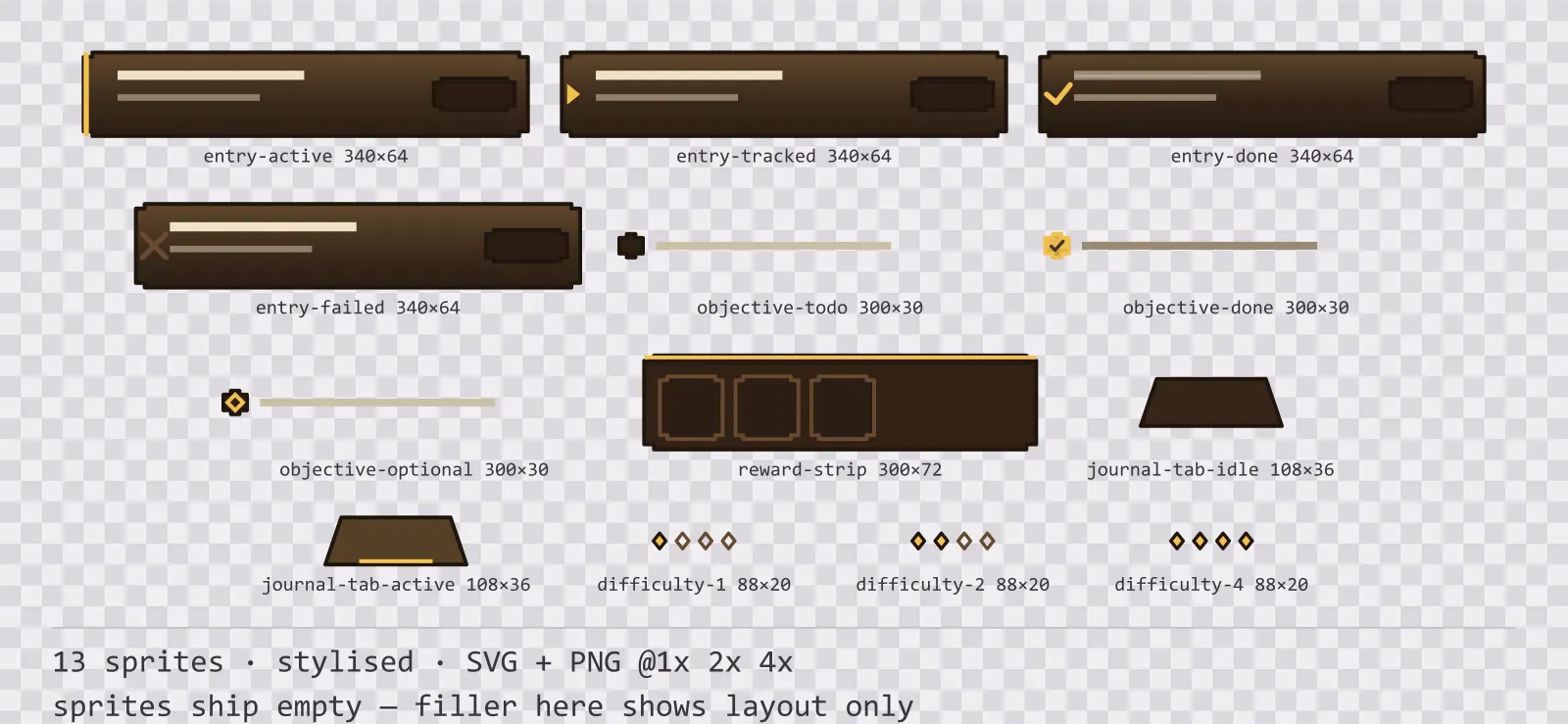
Oak Quest Log is a set of 13 quest log and objective widgets drawn in the stylised style, where the frame is carved, with finials pushing out past the corners and a gem set into each one. It contains four journal entry states, three objective row states, a reward preview strip, an active and an idle journal tab and three countable difficulty marks.
A quest log is a list where every row means something different from its neighbour, and the difference is almost always drawn as a colour: green for done, grey for failed, gold for tracked. Three greys and a gold later the log reads as a gradient rather than as a list, and a player scanning it for the one quest they are actually on has to read every line.
The ornament is part of the silhouette rather than drawn on top of it, so the frame is recognisable at thumbnail size. The face carries a three-stop vertical gradient — the closest a flat kit gets to a painted bevel.
Inside that style this is the Oak reading of it: a dark interface on a wood-brown palette with polished brass accents, built around two concentric frames, tab-shaped buttons at 160x48, glossy bars divided into 8 segments, and solid icons on a 32px grid. Those measurements are why two families can share an art style without being interchangeable: the style decides how an edge is drawn, the numbers decide what the interface is for.
All four states carry their mark in the same left-hand column, which is what lets a long log be scanned down one line rather than read: active takes a bar down the whole edge, tracked a wedge, done a tick and failed a cross. Done and failed therefore differ from each other by mark rather than by hue, and the column stays legible at any row height. The objective rows are a size down from the entries and share their left margin, which is what makes a nested objective read as belonging to the quest above it rather than as another quest.
Every sprite ships as an editable SVG and as transparent PNG at 1x, 2x and 4x, so you can drop the PNGs straight into an engine or open the vector and change a colour. Built to the same measurements as the rest of the Oak family, which means this kit and the Oak panel kit line up without either being resized. A good fit for fantasy and RPG interfaces.
Download
Direct link · no sign-up · no wait pageComplete set — SVG sources, PNG exports at 1x/2x/4x, licence and readme

How to use it
- Nine-slice the entries horizontally only; the left edge carries the tracked marker and stretching across it would stretch the marker with it.
- Indent objective rows to the entry margin they are drawn for rather than adding your own indent, and the nesting lines up.
- Use the difficulty marks by count. They are drawn as a countable series so a four-pip quest is comparable to a one-pip quest at a glance.
- Keep the reward strip below the objectives rather than in the entry header: it is drawn at full entry width and expects to be the last row of an expanded quest.
License
Creative Commons Attribution 4.0 — Free for commercial use. Credit required. Full terms · What this means in practice
"Oak Quest Log" by Oğuzhan Girgin, licensed under CC BY 4.0 — https://www.colorosse.com/assets/2d/ui/oak-quest-logAlso browse
More UI Packs
See all →
Aetherlab Backdrops
13 magitech background and overlay pieces for dark interfaces — lab navy with aether cyan accents. SVG plus transparent PNG at 1x, 2x and 4x.

Aetherlab Card Frames
18 magitech card, currency and notification components for dark interfaces — lab navy with aether cyan accents. SVG plus transparent PNG at 1x, 2x and 4x.

Aetherlab Character Sheet
12 magitech character sheet and stat widgets for dark interfaces — lab navy with aether cyan accents. SVG plus transparent PNG at 1x, 2x and 4x.

Aetherlab Crafting UI
13 magitech crafting and recipe widgets for dark interfaces — lab navy with aether cyan accents. SVG plus transparent PNG at 1x, 2x and 4x.