UI Packs
Charcoal Tutorial UI
12 hand-drawn tutorial and onboarding markers for dark interfaces — smoke grey with ember orange accents. SVG plus transparent PNG at 1x, 2x and 4x.
About this pack
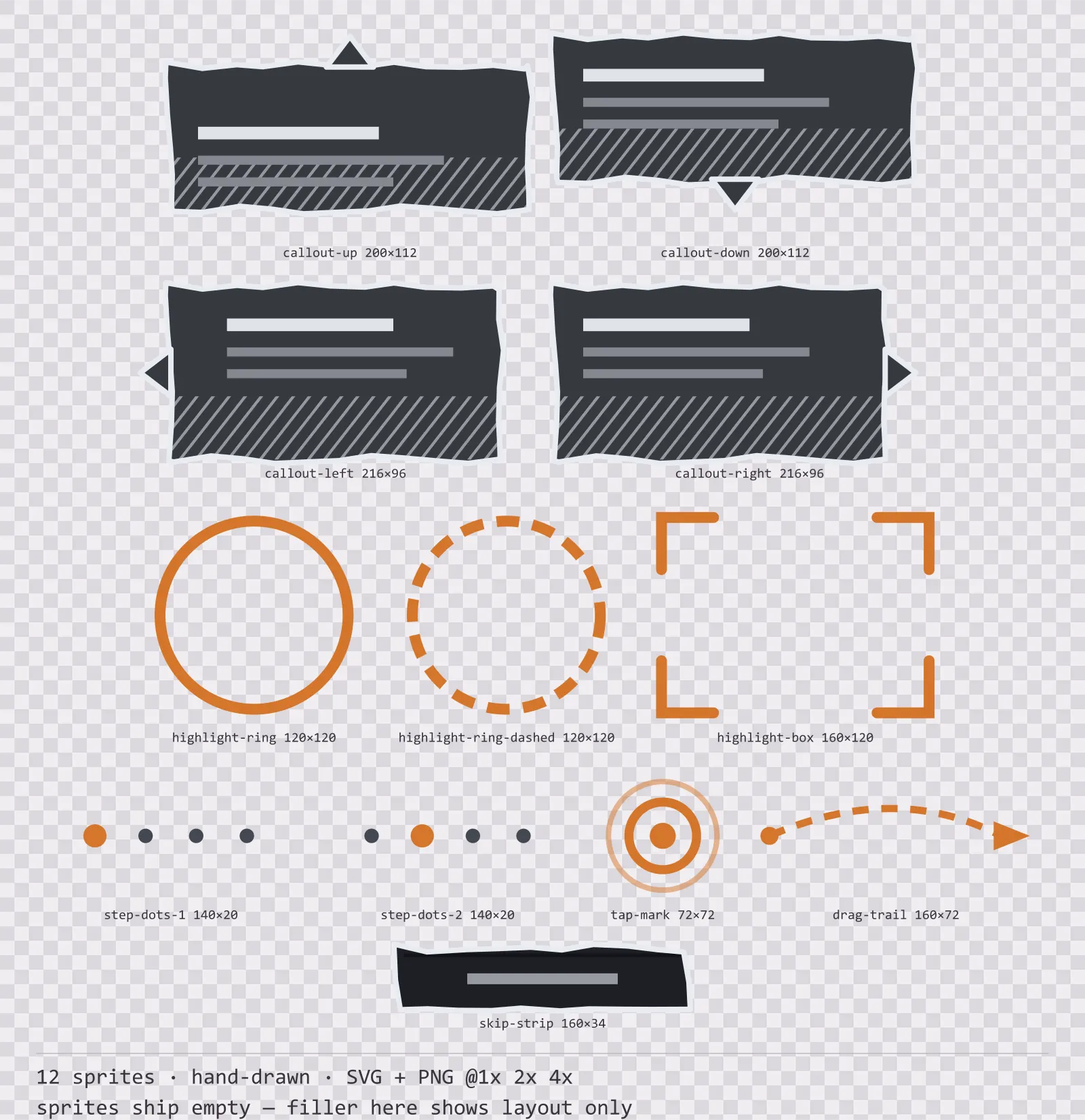
Charcoal Tutorial UI is a set of 12 tutorial and onboarding markers drawn in the hand-drawn style, where every edge is sampled and nudged, so no line is truly straight. It contains four directional callout balloons, a solid and a dashed highlight ring, a corner-bracket highlight box, two step indicator states, a tap mark, a drag gesture trail and a skip strip.
Every other kit in this catalogue covers part of the screen. This one points at it, and that inverts the rules: a highlight that fills its middle hides the thing it is highlighting, and a callout that can only point one direction is useless on three of the four screen edges.
The wobble is deterministic rather than random: the same box wobbles the same way every build, which is what lets it live in version control. Shading is cross-hatching, because a gradient under a drawn line reads as a filter rather than as a hand.
Inside that style this is the Charcoal reading of it: a dark interface on a smoke grey palette with ember orange accents, built around a single bordered frame, tab-shaped buttons at 160x52, hollow-cored bars divided into 7 segments, and two-tone icons on a 24px grid. Those measurements are why two families can share an art style without being interchangeable: the style decides how an edge is drawn, the numbers decide what the interface is for.
The callout ships with the tail on each of the four sides as separate sprites rather than one balloon to rotate, because rotating it throws the shading to the wrong side and a tutorial balloon is used at all four screen edges in the same session. The highlight ring and box are hollow, stroke only and no fill, so whatever is underneath stays fully visible, which is the entire point. The step dots are countable so a player can see how much of the tutorial is left, which is the one thing that keeps them pressing next.
Every sprite ships as an editable SVG and as transparent PNG at 1x, 2x and 4x, so you can drop the PNGs straight into an engine or open the vector and change a colour. Built to the same measurements as the rest of the Charcoal family, which means this kit and the Charcoal panel kit line up without either being resized. A good fit for notebook and storybook games.
Download
Direct link · no sign-up · no wait pageComplete set — SVG sources, PNG exports at 1x/2x/4x, licence and readme
How to use it
- Pick the callout by which edge it sits against rather than rotating one sprite; the tail files are drawn so their shading stays consistent across all four.
- Place the highlight ring or box over your target with nothing drawn inside it. A scrim belongs behind the highlight, not within it.
- Use the dashed ring for something the player should press and the solid ring for something they should look at, and keep that distinction for the whole tutorial.
- Drive the step dots from your real step count. A tutorial with a hidden length is the one players skip.
License
Creative Commons Attribution 4.0 — Free for commercial use. Credit required. Full terms · What this means in practice
"Charcoal Tutorial UI" by Oğuzhan Girgin, licensed under CC BY 4.0 — https://www.colorosse.com/assets/2d/ui/charcoal-tutorial-uiAlso browse
More UI Packs
See all →
Aetherlab Backdrops
13 magitech background and overlay pieces for dark interfaces — lab navy with aether cyan accents. SVG plus transparent PNG at 1x, 2x and 4x.

Aetherlab Card Frames
18 magitech card, currency and notification components for dark interfaces — lab navy with aether cyan accents. SVG plus transparent PNG at 1x, 2x and 4x.

Aetherlab Character Sheet
12 magitech character sheet and stat widgets for dark interfaces — lab navy with aether cyan accents. SVG plus transparent PNG at 1x, 2x and 4x.

Aetherlab Crafting UI
13 magitech crafting and recipe widgets for dark interfaces — lab navy with aether cyan accents. SVG plus transparent PNG at 1x, 2x and 4x.