UI Packs
Blocks Level Select
12 voxel level select and world map pieces for dark interfaces — cool stone with signal orange accents. SVG plus transparent PNG at 1x, 2x and 4x.
About this pack
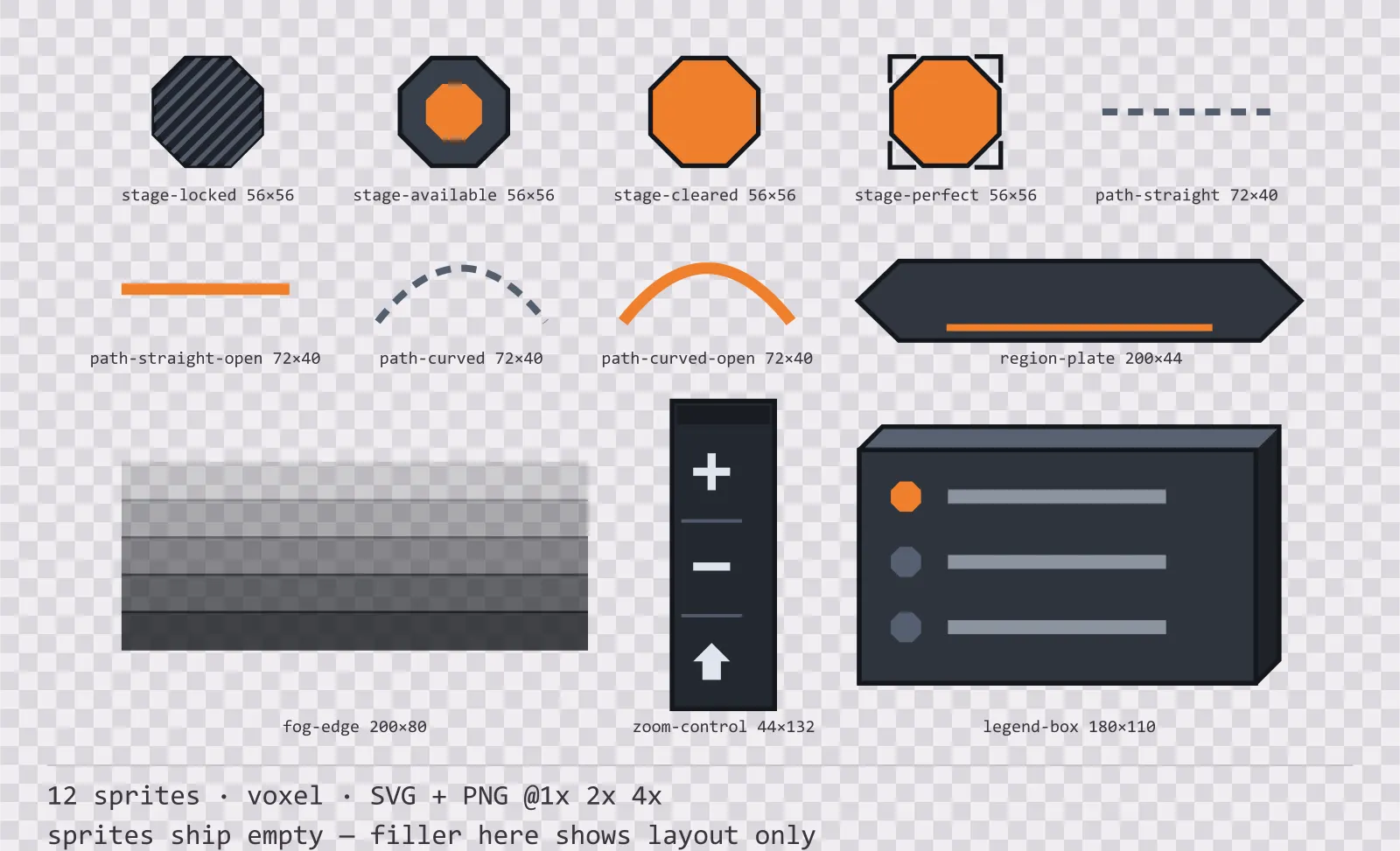
Blocks Level Select is a set of 12 level select and world map pieces drawn in the voxel style, where each surface is the front face of a cube with a lit top face and a shaded right face. It contains four stage node states, a straight and a curved path, each locked and open, a region name plate, a fog of war edge, a zoom control and a map legend box.
A level select map is built from two things, nodes and the lines between them, and the lines are what every free set leaves out. Drawing them in engine is where the map falls apart: a stroke drawn by code does not match the art style, and a path that is straight in one style and hand-wobbled in another cannot be a rectangle.
The extrusion is real geometry rather than a shadow: the light angle never changes, there are exactly three tones per block, and the front face is inset so the cube stays inside its own sprite bounds.
Inside that style this is the Blocks reading of it: a dark interface on a cool stone palette with signal orange accents, built around a single bordered frame, square-cornered buttons at 132x48, tick-marked bars divided into 8 segments, and solid icons on a 24px grid. Those measurements are why two families can share an art style without being interchangeable: the style decides how an edge is drawn, the numbers decide what the interface is for.
The paths ship in the same drawing language as the nodes, straight and curved, each in a locked and an open reading. Locked is dashed and thin, open is solid and full weight, which means progress along a map is visible as a change in the connections rather than only in the nodes. The four node states are told apart by structure: locked is hatched across, available carries a single dot at its centre, cleared fills solid and perfect adds four corner brackets to the filled node. The fog edge is drawn as a stepped band rather than a soft blur, because a blur rasterises differently in every engine and a map edge is exactly where that shows.
Every sprite ships as an editable SVG and as transparent PNG at 1x, 2x and 4x, so you can drop the PNGs straight into an engine or open the vector and change a colour. Built to the same measurements as the rest of the Blocks family, which means this kit and the Blocks panel kit line up without either being resized. A good fit for voxel and blocky games.
Download
Direct link · no sign-up · no wait pageComplete set — SVG sources, PNG exports at 1x/2x/4x, licence and readme

How to use it
- Place nodes on your own grid and lay the path pieces between them; the path sprites are drawn to the node spacing named in the specs box so they meet the node edge without overlap.
- Swap a locked path for its open twin when the stage unlocks rather than tinting it. The dash pattern is the signal.
- Anchor the fog edge to the boundary of the explored region and let it overlap the unexplored side; the stepped band is drawn to be tiled horizontally.
- The region plate and the legend box share a corner treatment with the panel kit in this family, so a map screen and a menu screen do not look like two different games.
License
Creative Commons Zero 1.0 — Public domain. No credit required. Full terms · What this means in practice
Also browse
More UI Packs
See all →
Aetherlab Backdrops
13 magitech background and overlay pieces for dark interfaces — lab navy with aether cyan accents. SVG plus transparent PNG at 1x, 2x and 4x.

Aetherlab Card Frames
18 magitech card, currency and notification components for dark interfaces — lab navy with aether cyan accents. SVG plus transparent PNG at 1x, 2x and 4x.

Aetherlab Character Sheet
12 magitech character sheet and stat widgets for dark interfaces — lab navy with aether cyan accents. SVG plus transparent PNG at 1x, 2x and 4x.

Aetherlab Crafting UI
13 magitech crafting and recipe widgets for dark interfaces — lab navy with aether cyan accents. SVG plus transparent PNG at 1x, 2x and 4x.