UI Packs
Recon Panel UI Kit — single-framed panels and buttons
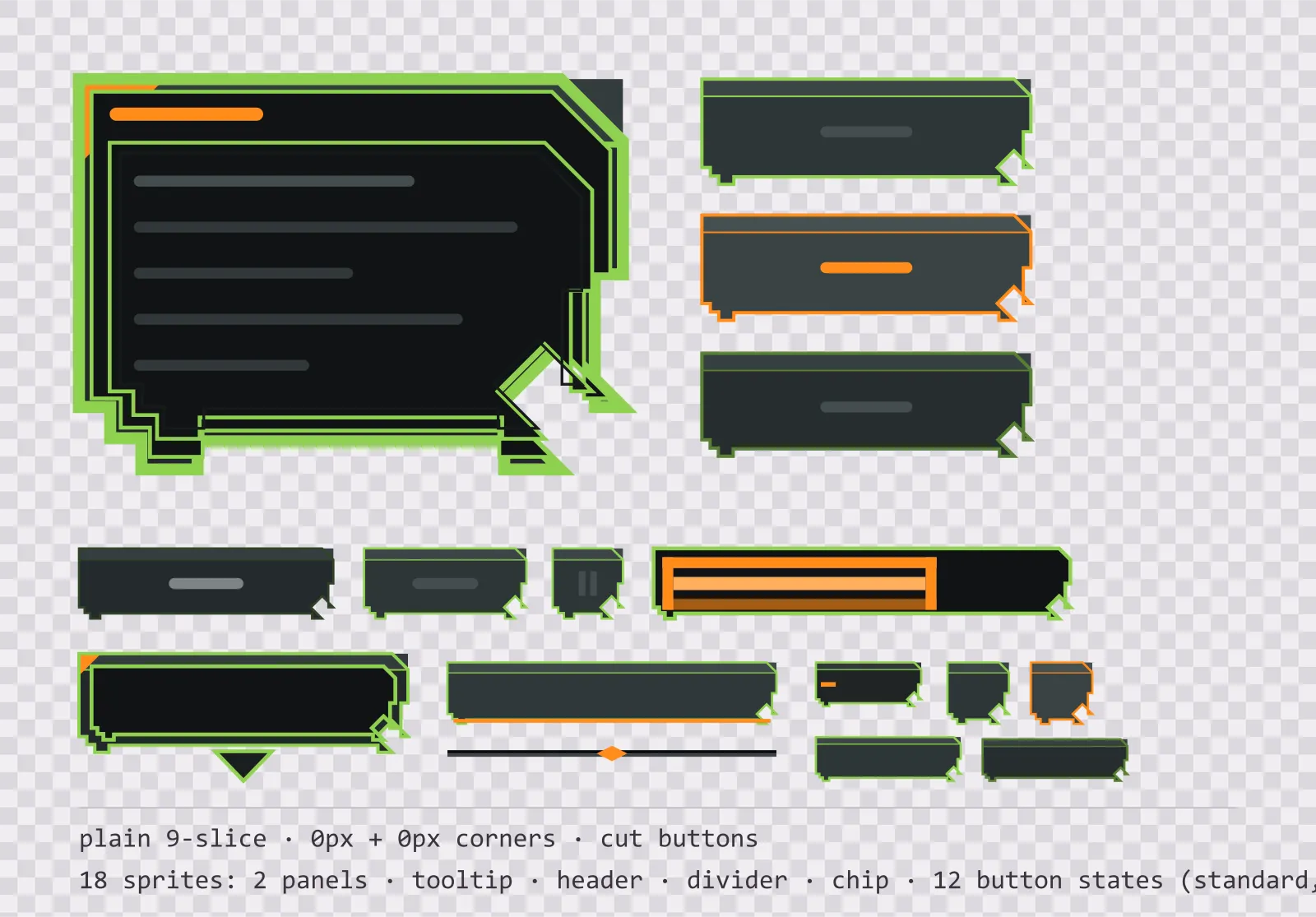
18 night optics interface sprites: single-framed nine-slice panels, a tooltip, a header bar, a divider, a chip and twelve chamfered button states. SVG plus transparent PNG.
About this pack
Night optics rather than daylight canvas: gunmetal body, phosphor green trace, a flare orange signal. Sized small because a recon overlay lives at the edge of the screen.
Two nine-slice panels — a single-framed window frame with 0 px corners and a recessed inset frame with 0 px corners — cover almost every box a menu needs: dialogs, inventory grids, list backgrounds, tooltips and stat panels. A single continuous border keeps the panel quiet enough to sit behind dense text. Both stretch cleanly to any size because the corners never scale and the centre is a flat fill.
On top of the panels sit twelve chamfered button sprites: default, hover, pressed and disabled, each drawn three times — a standard 116×32 bar, a square icon button and a compact button for toolbars and inline actions. The three sizes are separate files rather than one scaled sprite because the drawing is size-dependent: the chamfer computed at 32 px is recomputed at the smaller ones, not shrunk. The pressed state drops its face two pixels and removes the top highlight rather than just darkening, which is what makes a button feel clicked rather than merely recoloured.
Four smaller parts cover what a menu needs between the panels: a tooltip with a pointer tail, a header bar that sits along the top of a panel, a section divider with a centre mark, and a label chip for counts and status tags. None of them are the window panel at another size — a nine-slice already stretches to any size, so a second file at a different width would be filler rather than a component.
Everything ships twice. The SVG sources are the files the kit was drawn in — open them, change the six gunmetal tones or the single flare orange accent, and re-export. The PNG exports are flat, transparent and pre-scaled at 1x, 2x and 4x for engines that want bitmaps, with no premultiplied alpha and no baked-in shadow outside the sprite bounds.
Download
Direct link · no sign-up · no wait pageComplete kit — SVG sources, PNG exports at 1x/2x/4x, licence and readme


How to use it
- In Unity, import the PNGs, set Texture Type to Sprite (2D and UI), and set the border to 0, 0, 0, 0 for the window panel and 0, 0, 0, 0 for the buttons; then set Image Type to Sliced on the UI component.
- In Godot 4, use a NinePatchRect and set the patch margins to the same numbers, or drop the SVG straight in and let Godot rasterise it at the scale you set in the import options.
- In Unreal, import as a Texture2D, create a Slate Brush with Draw As set to Box, and enter the margin as a fraction of the texture size — for the 96 px panel and for the 116 px button.
- For crisp results at non-integer UI scales, use the 2x or 4x PNG rather than upscaling the 1x, or point your engine at the SVG source and let it rasterise at the final size.
License
Creative Commons Attribution 4.0 — Free for commercial use. Credit required. Full terms · What this means in practice
"Recon Panel UI Kit — single-framed panels and buttons" by Oğuzhan Girgin, licensed under CC BY 4.0 — https://www.colorosse.com/assets/2d/ui/recon-panel-ui-kitAlso browse
More UI Packs
See all →
Aetherlab Backdrops
13 magitech background and overlay pieces for dark interfaces — lab navy with aether cyan accents. SVG plus transparent PNG at 1x, 2x and 4x.

Aetherlab Card Frames
18 magitech card, currency and notification components for dark interfaces — lab navy with aether cyan accents. SVG plus transparent PNG at 1x, 2x and 4x.

Aetherlab Character Sheet
12 magitech character sheet and stat widgets for dark interfaces — lab navy with aether cyan accents. SVG plus transparent PNG at 1x, 2x and 4x.

Aetherlab Crafting UI
13 magitech crafting and recipe widgets for dark interfaces — lab navy with aether cyan accents. SVG plus transparent PNG at 1x, 2x and 4x.