UI Packs
Mint Character Sheet
12 flat character sheet and stat widgets for dark interfaces — blue-grey with mint green accents. SVG plus transparent PNG at 1x, 2x and 4x.
About this pack
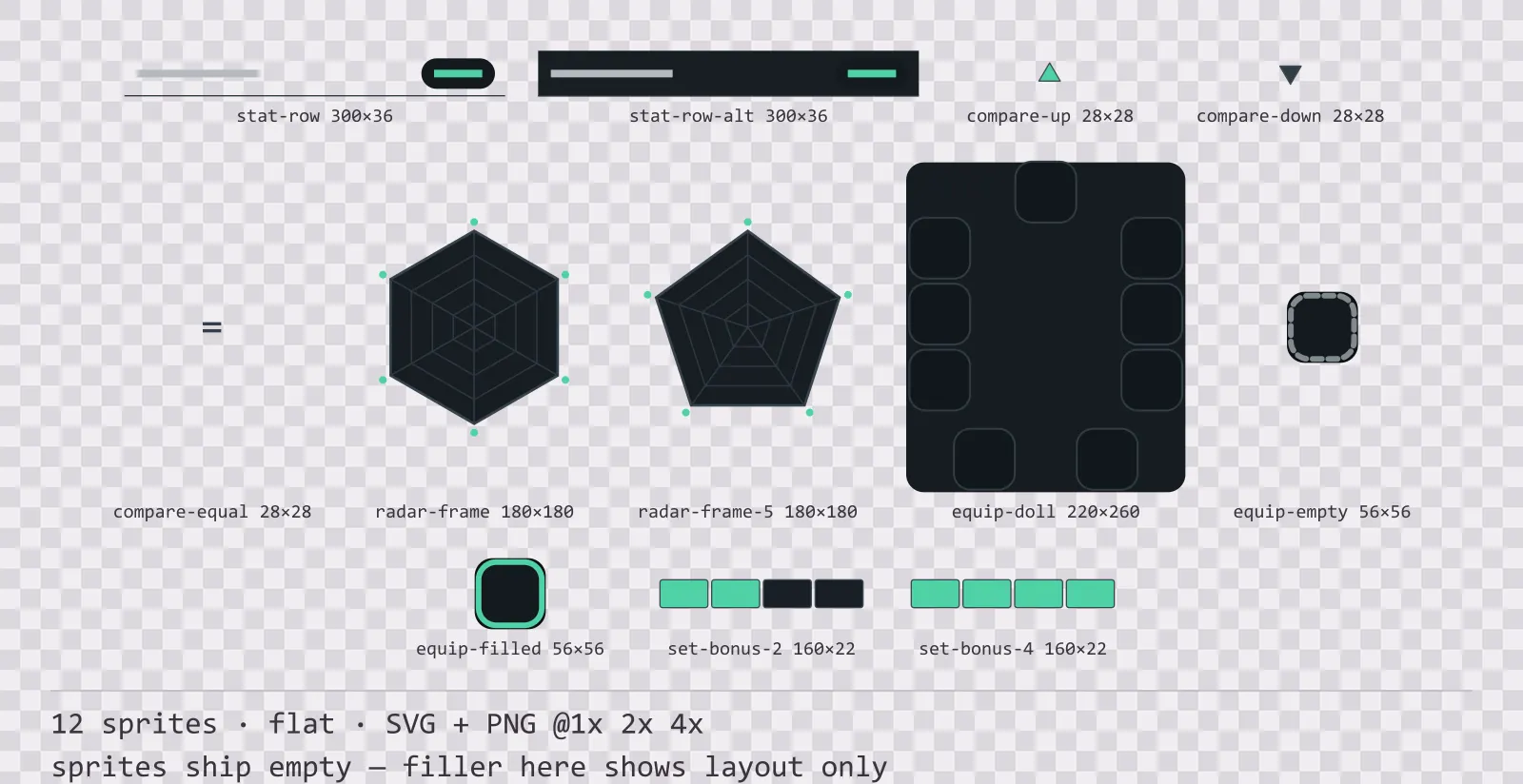
Mint Character Sheet is a set of 12 character sheet and stat widgets drawn in the flat style, where there are no outlines and no shading at all. It contains a stat row and an alternating band row, three comparison marks, a six-axis and a five-axis radar frame, an equipment doll frame, an empty and an occupied equipment slot and two set bonus strips.
The character sheet exists to answer one question, whether this new piece is better than the one already worn, and the piece of art that answers it is the smallest one in the kit. Most sets ship the frames and leave the comparison arrows to the engine, which is where they come out as a font glyph in a set that draws everything else by hand.
Depth comes only from a layered soft shadow — three stacked passes rather than a blur filter, because some SVG rasterisers scale a blur wrongly and the 4x PNG comes out as a smear. Everything else is one solid colour.
Inside that style this is the Mint reading of it: a dark interface on a blue-grey palette with mint green accents, built around a header band across the top of the frame, square-cornered buttons at 120x36, tick-marked bars divided into 12 segments, and two-tone icons on a 16px grid. Those measurements are why two families can share an art style without being interchangeable: the style decides how an edge is drawn, the numbers decide what the interface is for.
The up and down arrows are separate sprites rather than one arrow flipped, because both appear in the same comparison table and a flipped arrow lights from the wrong side. There is a third mark for unchanged, which matters more than it sounds: no arrow at all is ambiguous between equal and not comparable. The radar frame ships as grid and axes only, without a value polygon, because the values come from the game. What the kit owes is the scale, and it ships at both five and six axes so a stat system is not forced to have as many attributes as the artist assumed.
Every sprite ships as an editable SVG and as transparent PNG at 1x, 2x and 4x, so you can drop the PNGs straight into an engine or open the vector and change a colour. Built to the same measurements as the rest of the Mint family, which means this kit and the Mint panel kit line up without either being resized. A good fit for minimal and mobile interfaces.
Download
Direct link · no sign-up · no wait pageComplete set — SVG sources, PNG exports at 1x/2x/4x, licence and readme

How to use it
- Draw your value polygon over the radar frame in engine; the frame is a fixed scale with rings at even fractions, so a polygon can be plotted straight against it.
- Use all three comparison marks including the unchanged one. An absent arrow does not mean equal.
- Alternate the plain and banded stat rows down a long list rather than adding your own zebra fill; the band is drawn at a tone that survives the family retint.
- The equipment doll leaves its centre empty for your own character portrait, and the slot positions around it match the standalone equipment slot size exactly.
License
Creative Commons Zero 1.0 — Public domain. No credit required. Full terms · What this means in practice
Also browse
More UI Packs
See all →
Aetherlab Backdrops
13 magitech background and overlay pieces for dark interfaces — lab navy with aether cyan accents. SVG plus transparent PNG at 1x, 2x and 4x.

Aetherlab Card Frames
18 magitech card, currency and notification components for dark interfaces — lab navy with aether cyan accents. SVG plus transparent PNG at 1x, 2x and 4x.

Aetherlab Character Sheet
12 magitech character sheet and stat widgets for dark interfaces — lab navy with aether cyan accents. SVG plus transparent PNG at 1x, 2x and 4x.

Aetherlab Crafting UI
13 magitech crafting and recipe widgets for dark interfaces — lab navy with aether cyan accents. SVG plus transparent PNG at 1x, 2x and 4x.