UI Packs
Carbon Map Markers
12 realistic map markers and world indicators for dark interfaces — near black with warning amber accents. SVG plus transparent PNG at 1x, 2x and 4x.
About this pack
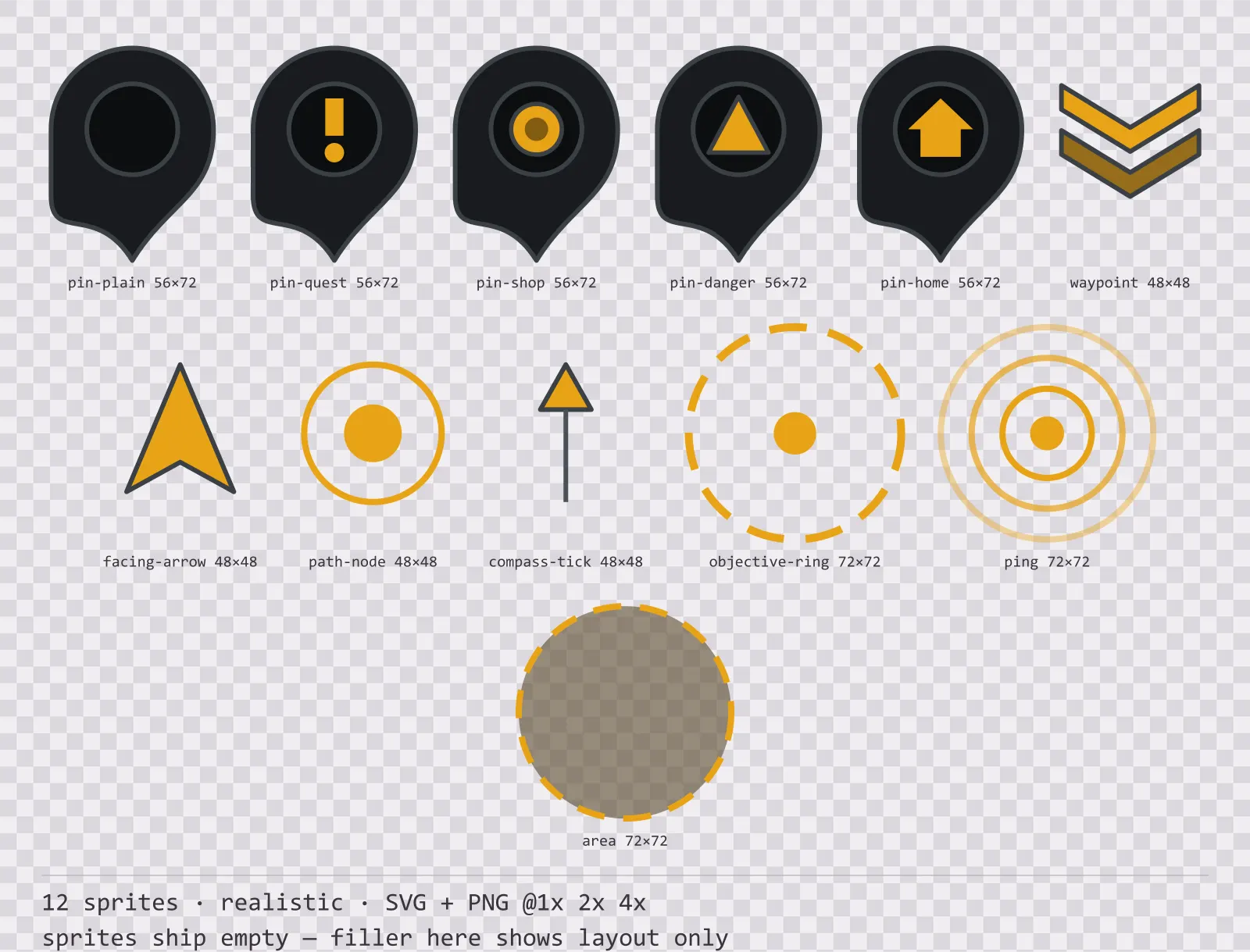
Carbon Map Markers is a set of 12 map markers and world indicators drawn in the realistic style, where a five-stop specular gradient runs down a brushed metal face with rivets at the corners. It contains five map pins — plain, quest, shop, danger and home, waypoint chevrons, a player facing arrow, a route node and a compass tick, an objective ring, ping rings and an area of effect.
Interface kits cover the edges of the screen. These sit in the middle of it, on top of the game, where the kit has no idea what is underneath — grass, snow, night. A marker that relies on a background to read against will disappear over half of your levels.
The brush texture is a 3px line pattern rather than real noise: noise triples the PNG weight for a texture nobody can see at 1x. The shadow is layered rather than blurred so it holds up at 4x.
Inside that style this is the Carbon reading of it: a dark interface on a near black palette with warning amber accents, built around four corner brackets in place of a closed border, chamfered buttons at 152x44, hollow-cored bars divided into 14 segments, and two-tone icons on a 32px grid. Those measurements are why two families can share an art style without being interchangeable: the style decides how an edge is drawn, the numbers decide what the interface is for.
Every marker carries its own outline and a single-colour body, so the silhouette does the work rather than the fill. The anchor is named in each sprite title and it is not the centre: a pin points at its target with the tip, so its anchor is bottom centre, while a ring and a facing arrow anchor at the middle. Placing a pin by its centre puts it half a pin above whatever it was meant to mark. The area and objective rings are dashed rather than solid because they describe a region rather than an edge — a solid ring reads as a wall.
Every sprite ships as an editable SVG and as transparent PNG at 1x, 2x and 4x, so you can drop the PNGs straight into an engine or open the vector and change a colour. Built to the same measurements as the rest of the Carbon family, which means this kit and the Carbon panel kit line up without either being resized. A good fit for realistic and simulation interfaces.
Download
Direct link · no sign-up · no wait pageComplete set — SVG sources, PNG exports at 1x/2x/4x, licence and readme

How to use it
- Anchor each sprite by the point named in its title: bottom centre for pins, centre for rings and the facing arrow.
- Keep markers at a fixed screen size rather than scaling them with distance; a pin that shrinks with the world stops being readable at exactly the distance you needed it.
- Use the ping rings as three frames of one animation — draw them outward and fade — rather than as three separate markers.
- Tint the pin body per faction but leave the outline alone; the outline is what keeps the marker readable over an unknown background.
License
Creative Commons Attribution 4.0 — Free for commercial use. Credit required. Full terms · What this means in practice
"Carbon Map Markers" by Oğuzhan Girgin, licensed under CC BY 4.0 — https://www.colorosse.com/assets/2d/ui/carbon-map-markersAlso browse
More UI Packs
See all →
Aetherlab Backdrops
13 magitech background and overlay pieces for dark interfaces — lab navy with aether cyan accents. SVG plus transparent PNG at 1x, 2x and 4x.

Aetherlab Card Frames
18 magitech card, currency and notification components for dark interfaces — lab navy with aether cyan accents. SVG plus transparent PNG at 1x, 2x and 4x.

Aetherlab Character Sheet
12 magitech character sheet and stat widgets for dark interfaces — lab navy with aether cyan accents. SVG plus transparent PNG at 1x, 2x and 4x.

Aetherlab Crafting UI
13 magitech crafting and recipe widgets for dark interfaces — lab navy with aether cyan accents. SVG plus transparent PNG at 1x, 2x and 4x.