UI Packs
Sandbox HUD Frames
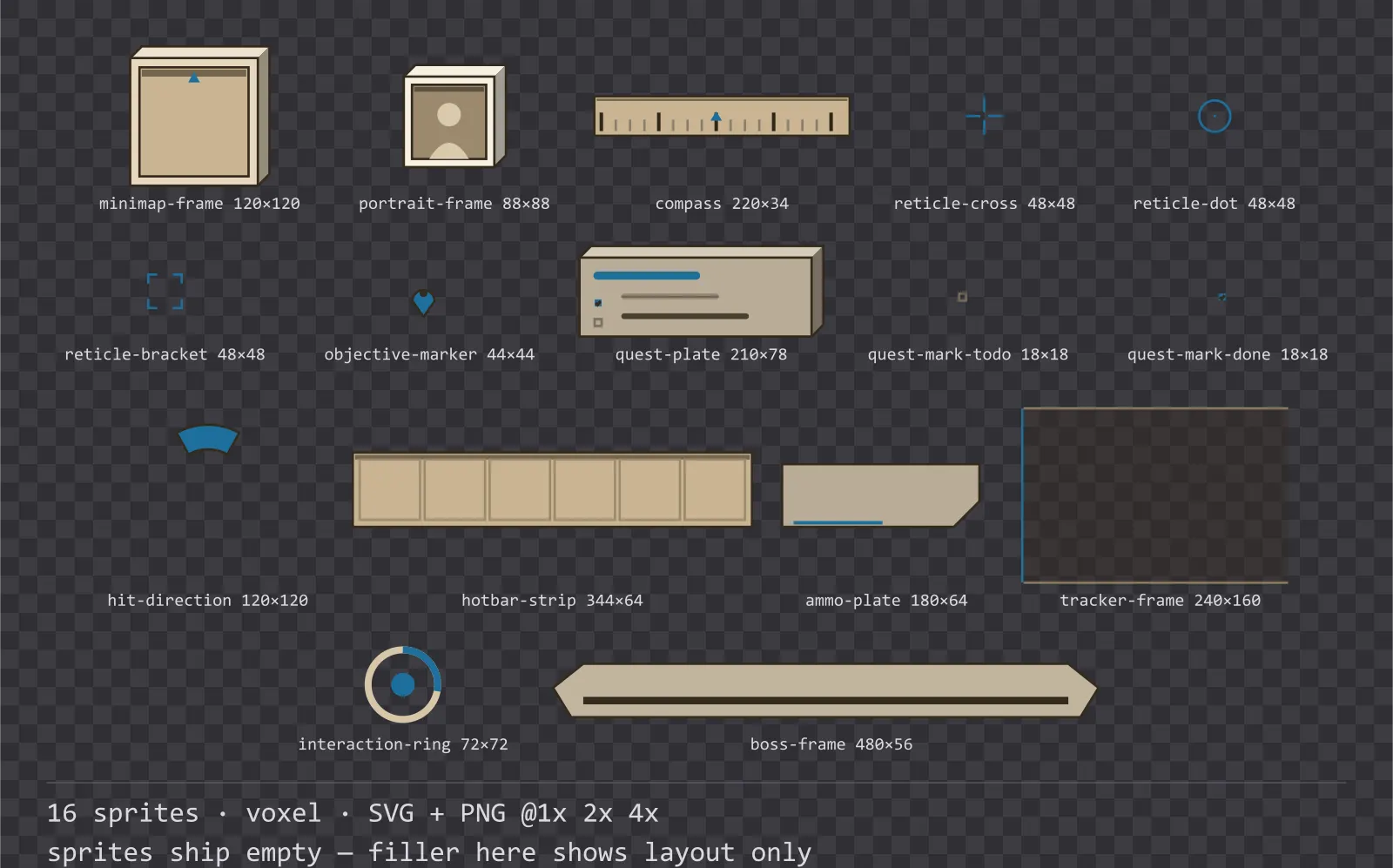
16 voxel heads-up display frames for light interfaces — desert tan with sky blue accents. SVG plus transparent PNG at 1x, 2x and 4x.
About this pack
Sandbox HUD Frames is a set of 16 heads-up display frames drawn in the voxel style, where each surface is the front face of a cube with a lit top face and a shaded right face. It contains a minimap frame with a north marker, a character portrait frame, a compass strip, three crosshair reticles, a directional damage arc, a six-cell hotbar strip, an ammunition plate, an objective tracker frame and waypoint marker, a hold-to-interact ring, a boss banner frame and a quest tracker plate.
These are the pieces that stay on screen the whole time a game is being played, which makes them the hardest to get right: every one of them has to be readable over arbitrary game art without covering the middle of the screen.
The extrusion is real geometry rather than a shadow: the light angle never changes, there are exactly three tones per block, and the front face is inset so the cube stays inside its own sprite bounds.
Inside that style this is the Sandbox reading of it: a light interface on a desert tan palette with sky blue accents, built around a header band across the top of the frame, chamfered buttons at 112x40, banded bars divided into 12 segments, and two-tone icons on a 16px grid. Those measurements are why two families can share an art style without being interchangeable: the style decides how an edge is drawn, the numbers decide what the interface is for.
The quest plate marks a completed objective with a filled box and a struck-through line rather than by dimming it, so the tracker stays legible against a bright sky. The compass ticks alternate major and minor so a heading can be read at a glance rather than counted.
Every sprite ships as an editable SVG and as transparent PNG at 1x, 2x and 4x, so you can drop the PNGs straight into an engine or open the vector and change a colour. Built to the same measurements as the rest of the Sandbox family, which means this kit and the Sandbox panel kit line up without either being resized. A good fit for voxel and blocky games.
Download
Direct link · no sign-up · no wait pageComplete set — SVG sources, PNG exports at 1x/2x/4x, licence and readme
How to use it
- Anchor the minimap frame to a screen corner and render your map texture into the recessed area; the north marker is part of the frame so it stays fixed while the map rotates.
- Draw the objective marker in screen space clamped to the viewport edge, not in world space, or it vanishes the moment the target is off camera.
- Pick one reticle and keep it — the three are alternatives for different weapon feels, not a set to mix within one game.
License
Creative Commons Zero 1.0 — Public domain. No credit required. Full terms · What this means in practice
Also browse
More UI Packs
See all →
Aetherlab Backdrops
13 magitech background and overlay pieces for dark interfaces — lab navy with aether cyan accents. SVG plus transparent PNG at 1x, 2x and 4x.

Aetherlab Card Frames
18 magitech card, currency and notification components for dark interfaces — lab navy with aether cyan accents. SVG plus transparent PNG at 1x, 2x and 4x.

Aetherlab Character Sheet
12 magitech character sheet and stat widgets for dark interfaces — lab navy with aether cyan accents. SVG plus transparent PNG at 1x, 2x and 4x.

Aetherlab Crafting UI
13 magitech crafting and recipe widgets for dark interfaces — lab navy with aether cyan accents. SVG plus transparent PNG at 1x, 2x and 4x.