UI Packs
Dusk Inventory Slots — 48px grid
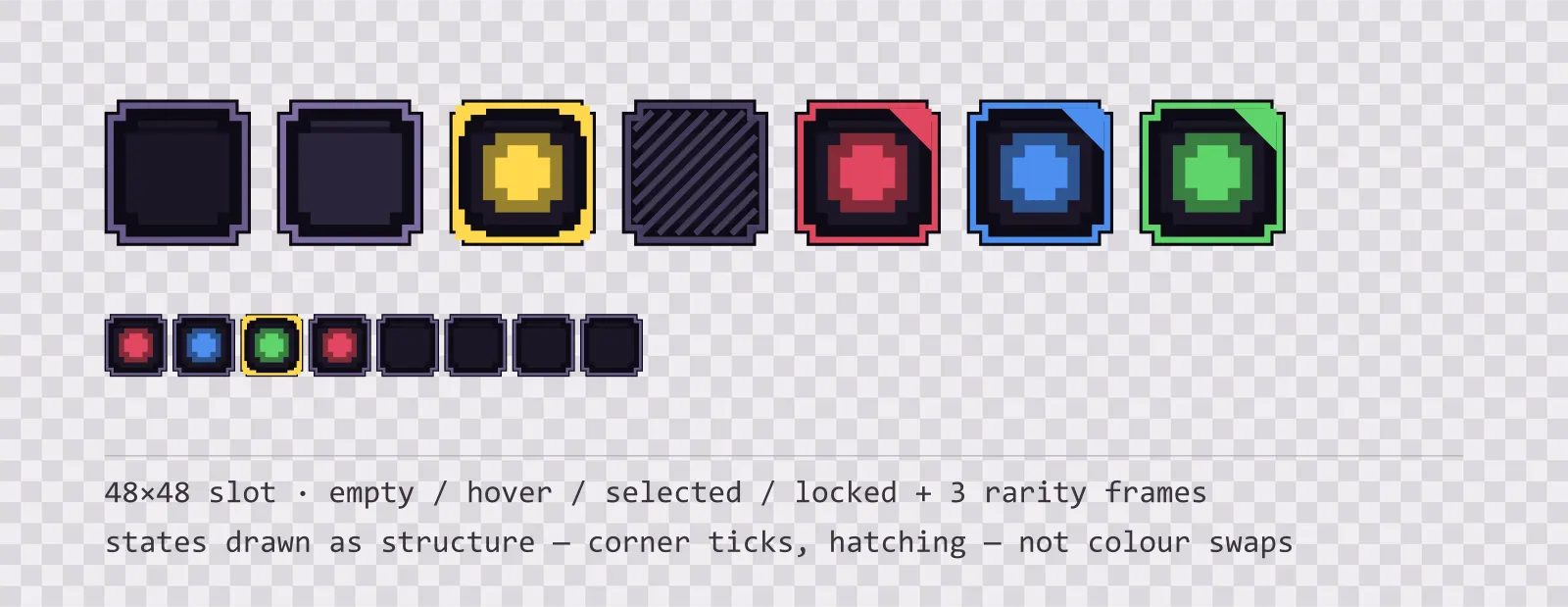
13 48×48 dusk purple inventory slots: empty, hover, selected, locked, blocked and drop states, round and hex equipment slots, a hotbar slot and three rarity frames.
About this pack
A 48 pixel inventory grid on a power-of-two pitch. The locked state is diagonal hatching rather than a dimmed tint, because dimming a slot in a dark palette produces something almost identical to the empty state.
An inventory grid does not need a panel, it needs a square that tiles. Every slot here is 48×48 with the same outer bounds — the one exception is the two-cell slot for large items, which is 96×48 and is a separate file rather than a stretched square, because stretching a slot that is not nine-sliced deforms its corners. Put them 52 px apart and the borders read as a single grid rather than a row of separate boxes.
The states are drawn as structure, not colour. The selected slot gets corner ticks, the locked slot gets diagonal hatching, the hover slot lifts its border a step, the blocked slot carries a cross and the drop target a dashed accent frame. This is deliberate: the inventory screen is the noisiest surface in most games, sitting under item art in every hue at once, and a state that is only a border colour is invisible the moment a red sword is sitting in the slot.
Blocked and locked are separate sprites on purpose. A locked slot can be opened later; a blocked one is refusing the item currently on the cursor. Drawing them the same way is how an inventory ends up teaching a player the wrong rule. The equipment slots break the square for the same reason — an accessory socket is round and a gem socket is hexagonal, so the shape says what belongs there before any tooltip does.
The three rarity frames reuse the hp, mp and xp colours from the rest of the family, each with a corner marker as well as a coloured border — so a player sorting by rarity is reading two signals, and neither of them is competing with the item art in the middle of the slot.
Everything is included as editable SVG and as flat transparent PNG at 1x, 2x and 4x. The slot interiors are transparent, so whatever you render behind the grid shows through instead of a baked background colour.
Download
Direct link · no sign-up · no wait pageComplete set — SVG sources, PNG exports at 1x/2x/4x, licence and readme


How to use it
- Lay the slots out on a 52 px pitch — the 48 px sprite plus a 4 px gutter — and the borders stay one pixel apart instead of doubling up.
- Draw the item icon centred in the slot at roughly 34 px; the inner recess is 42 px, so anything larger will touch the border and lose the frame.
- Swap the whole slot sprite for the selected and locked states rather than overlaying a tint, because the corner ticks and hatching are part of the sprite.
- The rarity frames are drop-in replacements for the empty slot — same bounds, same recess — so a rarity change is a single texture swap with no layout change.
- A 48 px slot fits a 32 px item sprite with an 8 px margin, which is the pitch most 16-bit era inventories used and the reason the numbers here are all powers of two.
License
Creative Commons Attribution 4.0 — Free for commercial use. Credit required. Full terms · What this means in practice
"Dusk Inventory Slots — 48px grid" by Oğuzhan Girgin, licensed under CC BY 4.0 — https://www.colorosse.com/assets/2d/ui/dusk-inventory-slotsAlso browse
More UI Packs
See all →
Aetherlab Backdrops
13 magitech background and overlay pieces for dark interfaces — lab navy with aether cyan accents. SVG plus transparent PNG at 1x, 2x and 4x.

Aetherlab Card Frames
18 magitech card, currency and notification components for dark interfaces — lab navy with aether cyan accents. SVG plus transparent PNG at 1x, 2x and 4x.

Aetherlab Character Sheet
12 magitech character sheet and stat widgets for dark interfaces — lab navy with aether cyan accents. SVG plus transparent PNG at 1x, 2x and 4x.

Aetherlab Crafting UI
13 magitech crafting and recipe widgets for dark interfaces — lab navy with aether cyan accents. SVG plus transparent PNG at 1x, 2x and 4x.