UI Packs
Dusk HUD Bars — hp, mp and xp
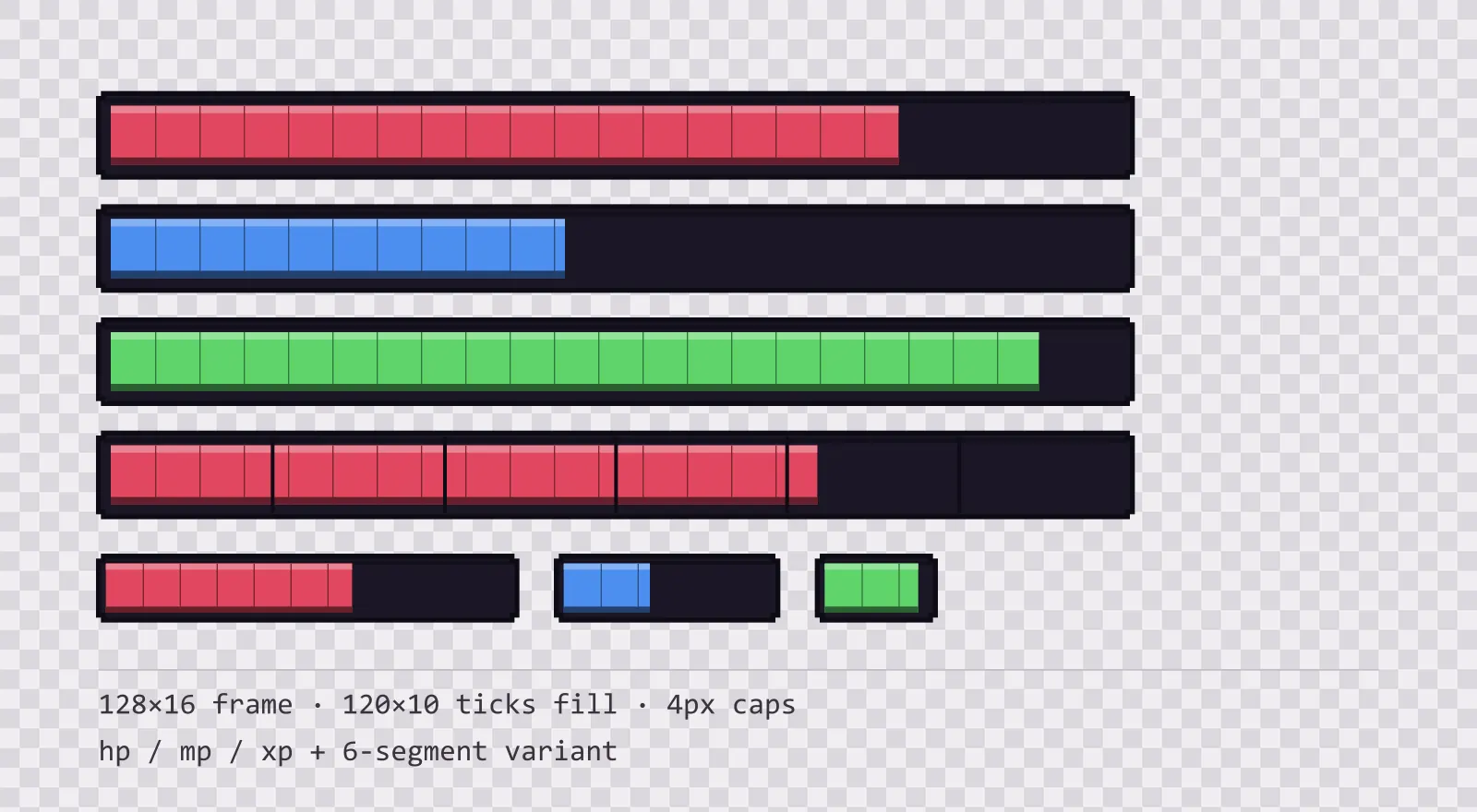
16 dusk purple HUD bar sprites: standard, slim and vertical frames, three ticked fills in each, plus segmented, ghost and shield variants. SVG plus transparent PNG.
About this pack
Bars at 128x16 with six ticks, sized for a screen that gets upscaled rather than one that is already large. Every edge lands on the 4px grid and the ticks are gaps in the fill rather than lines over it, so an integer upscale keeps them exactly one pixel wide instead of smearing them into the bar.
The frame is a nine-slice with 4 px end caps, so it stretches to any width without the ends deforming — a full-width boss bar and a 40 px enemy nameplate bar use the same file.
The fills are separate sprites rather than baked into the frame, which is the part that matters in practice: you scale the fill's width from zero to full and the frame never moves. Each fill carries regular tick marks along its length, which turns a percentage into something a player can count at a glance without a segmented frame.
There are three colours, one per resource: hp, mp and xp. They are spaced apart in brightness as well as hue, which is the part that survives a greyscale screenshot and the most common forms of colour blindness. A set tuned to identical lightness looks balanced in a swatch row and collapses into one grey block on screen.
The segmented variant adds 5 notch lines over the same frame, for games that count discrete pips — hearts, charges, ammo — rather than a continuous percentage. It is a separate file rather than an overlay, so you can drop it in without changing your bar widget.
Three frame builds cover where bars actually sit: the standard bar, a slim one for enemy nameplates, and a vertical one, because a mana column is not a rotated health bar — rotating a nine-slice stretches its caps along the wrong axis. Each build has its own set of three fills.
Two overlay fills handle the states a single bar cannot show on its own. The ghost fill is hollow and dashed: it marks the segment just lost, so a hit reads as a change rather than a new number. The shield fill is hatched rather than tinted, because an absorb layer sits on top of the resource bar and a second colour there collides with the colour underneath it. Everything is included as editable SVG and as flat transparent PNG at 1x, 2x and 4x.
Download
Direct link · no sign-up · no wait pageComplete kit — SVG sources, PNG exports at 1x/2x/4x, licence and readme

How to use it
- Draw the frame first, then the fill on top with its left edge inset by the 4 px cap width; animating only the fill's width keeps the frame's ends perfectly still.
- In Unity, set the fill image to Image Type Filled with Fill Method Horizontal, or use a Sliced image and animate the RectTransform width — both work because the fill has no rounded corners of its own.
- In Godot 4, a TextureProgressBar with the frame as Under Texture and the fill as Progress Texture reproduces the whole thing with no code, and Stretch Mode set to Tile keeps the caps intact.
- For pip-style resources, use the segmented frame and snap the fill width to multiples of one sixth of the inner width so the fill edge always lands on a notch.
License
Creative Commons Attribution 4.0 — Free for commercial use. Credit required. Full terms · What this means in practice
"Dusk HUD Bars — hp, mp and xp" by Oğuzhan Girgin, licensed under CC BY 4.0 — https://www.colorosse.com/assets/2d/ui/dusk-hud-barsAlso browse
More UI Packs
See all →
Aetherlab Backdrops
13 magitech background and overlay pieces for dark interfaces — lab navy with aether cyan accents. SVG plus transparent PNG at 1x, 2x and 4x.

Aetherlab Card Frames
18 magitech card, currency and notification components for dark interfaces — lab navy with aether cyan accents. SVG plus transparent PNG at 1x, 2x and 4x.

Aetherlab Character Sheet
12 magitech character sheet and stat widgets for dark interfaces — lab navy with aether cyan accents. SVG plus transparent PNG at 1x, 2x and 4x.

Aetherlab Crafting UI
13 magitech crafting and recipe widgets for dark interfaces — lab navy with aether cyan accents. SVG plus transparent PNG at 1x, 2x and 4x.